ai-nexus Documentation
However many rules you install, only 2-3 load per prompt. Filtering happens before Claude, not inside Claude.
Installation
Install ai-nexus globally with a single command:
$ npx ai-nexus installOr use interactive mode for full control over what gets installed:
$ npx ai-nexus install -iQuick Start
# Interactive setup (recommended)
npx ai-nexus install -i

# Quick install with defaults
npx ai-nexus install

# Use your team's rules
npx ai-nexus install --rules github.com/your-org/team-rules

# Install in current project only
npx ai-nexus init
Supported Tools
| Tool | Method | Token overhead |
|---|---|---|
| Claude Code | Semantic Router dynamically swaps rules per prompt | Only relevant rules loaded |
| Cursor | Converts rules to .mdc format; Cursor's built-in search handles filtering | Depends on Cursor's search |
| Codex | Aggregated AGENTS.md (rules merged into single file) | All rules loaded |
Commands
| Command | Description |
|---|---|
install | Install rules globally (~/.claude/) |
install -i | Interactive mode — choose tools, rules, template |
init | Install in current project (.claude/) |
update | Sync latest rules (respects local changes) |
list | Show installed rules |
browse | Open rule marketplace in browser |
test <prompt> | Preview which rules would load |
search [keyword] | Search community rules from the registry |
get <filename> | Download a rule from the community registry |
add <url> | Add rules from a Git repository |
remove <name> | Remove a rule source |
doctor | Diagnose installation issues |
uninstall | Remove ai-nexus installation |
Browse Marketplace
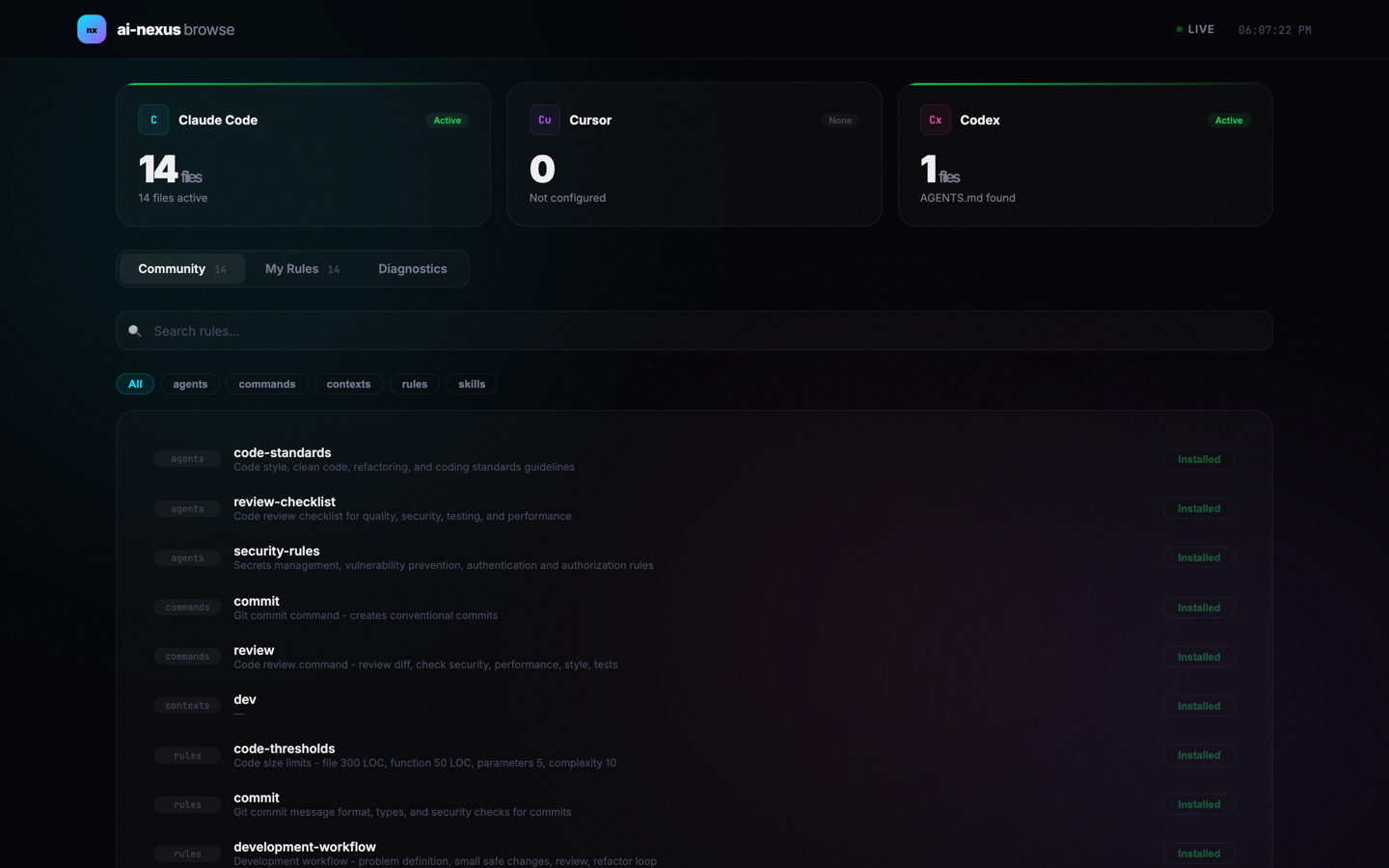
Open a web-based marketplace to search, install, and remove rules with one click:
$ npx ai-nexus browse        # default port 3847
$ npx ai-nexus browse 8080   # custom port
The marketplace runs locally on http://localhost:3847 and provides:
- Community tab — browse and search all community rules with category filters
- My Rules tab — view installed rules and remove with one click
- Diagnostics tab — system health checks and rule source info
- Tool status cards — Claude Code, Cursor, Codex at a glance
Testing Rules
Preview which rules would load for a given prompt:
$ npx ai-nexus test "write a react component with hooks"

Selected rules (3):
  rules/essential.md
  skills/react.md

$ npx ai-nexus test --list    # show all registered keywords
How It Works
Claude Code: Semantic Router
A study from ETH Zurich (12 repos, 5,694 PRs) found that loading all rules at once hurts performance by ~3% and increases cost by 20%+. The Semantic Router solves this — a hook runs on every prompt, analyzing what rules you actually need:
- With AI routing (recommended) — GPT-4o-mini or Claude Haiku analyzes your prompt and picks the right rules. Cost: ~$0.50/month.
- Without AI (fallback) — keyword matching activates rules based on words in your prompt.
# Enable AI routing
export OPENAI_API_KEY=sk-xxx        # or ANTHROPIC_API_KEY
export SEMANTIC_ROUTER_ENABLED=true
Cursor: Rule Converter
ai-nexus converts .md rules to Cursor's .mdc format, adding description and alwaysApply metadata automatically. After conversion, Cursor's built-in semantic search handles rule filtering — ai-nexus does not run a router for Cursor.
Codex: Aggregated Rules
Individual rule files are aggregated into a single AGENTS.md file, which is loaded at session start. No dynamic loading.
npx ai-nexus install) to pick only relevant categories and files. Recommended starting set: essential.md, commit.md, security.md.
Directory Structure
Update & Local Priority
Rules are installed as independent copies. Your customizations are always safe:
- Existing files are never overwritten during install or update
- Only new files from source are added
npx ai-nexus updatesyncs new rules from the latest package- Use
--forceto override (backup first!)
# Sync new rules without overwriting local edits
$ npx ai-nexus update

# Force overwrite everything
$ npx ai-nexus update --forcenpx ai-nexus update — symlinks are automatically converted to copies.
Rule Format
Rules are markdown files with optional frontmatter:
---
description: When to load this rule (used by semantic router)
---

# Rule Title

Your rule content...
Categories:
| Directory | Purpose |
|---|---|
rules/ | Coding rules (essential, security, commit conventions) |
commands/ | Slash commands (/commit, /review) |
skills/ | Domain knowledge (react, rust, python) |
agents/ | Sub-agents (code reviewer, security checker) |
contexts/ | Context files (@dev, @research) |
Semantic Router Setup
By default, ai-nexus uses keyword matching to select rules — no API key needed, zero cost. For smarter rule selection, enable AI-powered routing.
Step 1: Choose a Provider
| Provider | Model | Cost |
|---|---|---|
| OpenAI | gpt-4o-mini (default) | ~$0.50/month |
| Anthropic | claude-3-haiku (default) | ~$0.50/month |
Only one provider is needed. If both keys are set, Anthropic is used first.
Step 2: Set Environment Variables
Add the following to your shell profile (~/.zshrc, ~/.bashrc, or ~/.bash_profile):
# Option A: OpenAI
export OPENAI_API_KEY=sk-xxx
export SEMANTIC_ROUTER_ENABLED=true

# Option B: Anthropic
export ANTHROPIC_API_KEY=sk-ant-xxx
export SEMANTIC_ROUTER_ENABLED=true
Then reload your shell:
$ source ~/.zshrcStep 3: Custom Model (Optional)
Override the default model with these environment variables:
# Use a different OpenAI model
export OPENAI_MODEL=gpt-4o

# Use a different Anthropic model
export ANTHROPIC_MODEL=claude-3-5-haiku-20241022
Step 4: Verify
Test that the semantic router is working:
$ npx ai-nexus test "write a react component"

Method: AI (Semantic Router)

Selected files (3):
  • rules/essential.md
  • skills/react.md
  • rules/typescript.md
If the output shows AI (Semantic Router), AI routing is active. If it shows Keyword matching, check that your API key and SEMANTIC_ROUTER_ENABLED are set correctly.
Team Rules
Share rules across your team via Git:
# Everyone installs from the same source
$ npx ai-nexus install --rules github.com/acme/team-rules

# When rules are updated
$ npx ai-nexus update
Creating a Rules Repository
Multi-Source Setup
Combine rules from multiple Git repositories:
# Base company rules
$ npx ai-nexus install --rules github.com/acme/base-rules

# Add frontend team rules
$ npx ai-nexus add github.com/acme/frontend-rules

# Add security rules
$ npx ai-nexus add github.com/acme/security-rules

# Update all at once
$ npx ai-nexus update
Community Registry
Browse and download community-contributed rules directly from GitHub — no npm publish needed.
# List all available rules
$ npx ai-nexus search

# Search by keyword
$ npx ai-nexus search react

# Download a rule
$ npx ai-nexus get react.md

# Specify category when name exists in multiple
$ npx ai-nexus get commit.md --category commands
Or use the web marketplace for a visual experience:
$ npx ai-nexus browseFAQ
How is this different from Claude Code skills (alwaysApply: false)?
Skills already handle on-demand loading within Claude Code. ai-nexus is for a different use case:
- You use multiple tools (Claude Code + Cursor + Codex) and want one set of rules
- You want 230+ community rules without writing everything from scratch
- You prefer routing via keyword matching (free) or a cheaper model instead of Claude
If you only use Claude Code and skills cover your needs, you may not need ai-nexus.
Why not just put everything in CLAUDE.md or AGENTS.md?
You can — but it doesn't scale. CLAUDE.md loads on every prompt regardless of what you're doing. With 5 rules, that's fine. With 50+, you're burning tokens on Docker best practices while writing a commit message. The ETH Zurich study shows this hurts both performance and cost.
ai-nexus solves this by loading only 2-3 relevant rules per prompt, while keeping the rest parked.
Why not just use Claude Code skills instead of rules?
Skills are great for on-demand workflows you explicitly invoke (/commit, /review). But they don't replace rules — rules are passive guidelines that apply automatically (coding conventions, security standards, naming patterns). You shouldn't have to remember to invoke /security-checklist every time you write code.
ai-nexus handles both: it routes rules and skills based on your prompt, so the right context loads automatically without you thinking about it.